Filter Interceptor
Sample source: dubbo-go-samples/filter.
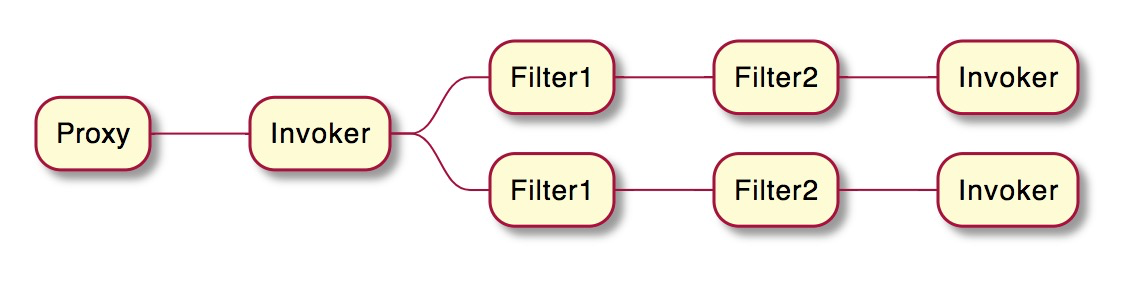
Filters dynamically intercept requests or responses to transform or utilize the information contained in them. A filter does not usually create a response by itself. Instead, it provides reusable logic that can be attached to RPC calls. Dubbo filters are pluggable, so you can compose multiple filters into one consumer or provider invocation chain.
The working principle of filters is illustrated in the diagram below:
Usage
1. Concept of Filter Interceptor
Filter is defined as follows:
// Filter interface defines the functions of a filter
// Extension - Filter
type Filter interface {
	// Invoke is the core function of a filter, it determines the process of the filter
	Invoke(context.Context, protocol.Invoker, protocol.Invocation) protocol.Result
	// OnResponse updates the results from Invoke and then returns the modified results.
	OnResponse(context.Context, protocol.Result, protocol.Invoker, protocol.Invocation) protocol.Result
}
Filters can be loaded on either the Consumer or Provider side. On the Consumer side, Invoke forwards the call to the
network layer, and OnResponse runs after the response comes back. On the Provider side, Invoke forwards the call to
user code, and OnResponse runs after user code finishes and before the response is written back to the network.
This aspect-oriented design makes filters a natural place to implement logging, metrics, tracing, authentication, traffic protection, graceful shutdown, generic invocation adaptation, and other cross-cutting capabilities.
2. Loading Filters
For new projects, prefer importing only the filters you actually use:
import _ "dubbo.apache.org/dubbo-go/v3/filter/echo"
import _ "dubbo.apache.org/dubbo-go/v3/filter/generic"
If you want a one-stop import of most built-in Dubbo Go SDK capabilities, you can also import:
import _ "dubbo.apache.org/dubbo-go/v3/imports"
There is also a legacy bulk import:
import _ "dubbo.apache.org/dubbo-go/v3/filter/filter_impl"
3. Built-in Filters
The framework provides a set of predefined filters that can be enabled directly in configuration. Their code lives in the filter directory.
- accesslog
- active
- padasvc: Adaptive Service Provider Filter
- sign: Auth Consumer Filter
- auth: Auth Provider Filter
- echo
- execute: Execute Limit Filter
- generic: Generic Consumer Filter
- generic_service: Generic Provider Filter
- pshutdown: Graceful Shutdown Provider Filter
- cshutdown: Graceful Shutdown Consumer Filter
- metrics
- otelServerTrace / otelClientTrace: OpenTelemetry trace filters
- polaris-limit: Polaris rate limit filter
- seata
- sentinel-provider
- sentinel-consumer
- token
- tps
- tracing: tracing filter
hystrix_consumer and hystrix_provider were available in earlier releases. In current 3.3.x documentation, focus on
the built-in filters that still exist in the main repository and imports package.
4. Default Filter Chains
If you do not override filter configuration, Dubbo Go SDK applies the following default filter chains:
- Consumer: cshutdown
- Provider: echo, token, accesslog, tps, generic_service, execute, pshutdown
Additional filters may be appended automatically by configuration. For example:
metricscan be appended when metrics are enabledotelServerTraceorotelClientTracecan be appended when OpenTelemetry tracing is enabledpadasvccan be appended on the provider side when adaptive service is enabled
When users configure custom filter loading strategies, the framework merges user-configured filters with these default chains instead of replacing all runtime behavior blindly.
A minimal configuration example looks like this:
dubbo:
  consumer:
    filter: "metrics,tracing"
  provider:
    filter: "accesslog,tps"
Use consumer.filter / reference.filter for client-side behavior and provider.filter / service.filter for
provider-side behavior, depending on whether you are configuring at the root level or per-service level.
5. Custom Filters
Users can create custom filters in their code, register them with the framework, and select them in configuration.
func init() {
	extension.SetFilter("myCustomFilter", NewMyClientFilter)
}

func NewMyClientFilter() filter.Filter {
	return &MyClientFilter{}
}

type MyClientFilter struct {
}

func (f *MyClientFilter) Invoke(ctx context.Context, invoker protocol.Invoker, invocation protocol.Invocation) protocol.Result {
	fmt.Println("MyClientFilter Invoke is called, method Name = ", invocation.MethodName())
	return invoker.Invoke(ctx, invocation)
}
func (f *MyClientFilter) OnResponse(ctx context.Context, result protocol.Result, invoker protocol.Invoker, protocol protocol.Invocation) protocol.Result {
	fmt.Println("MyClientFilter OnResponse is called")
	return result
}